Kimim ben?

Doruk Kutlu
JavaScript Geliştirici
 @doruk
 @d0ruk
Du bi dinle
ES2015'e kadar, JS'in standartlaşmış bir modül yükleme sistemi yoktu.
Revealing Module
var revealingModule = (function () {
  // this === window
  var private = "yassah",
    public = "selam";

  function privateFn() { return private; }

  return {
    setPrivate(val) { private = val; },
    getPrivate: privateFn,
    public,
  };
})();
console.log(revealingModule.private); // undefined
console.log(revealingModule.getPrivate()); // yassah
revealingModule.setPrivate("mahrem");
console.log(revealingModule.getPrivate()); // mahrem
console.log(revealingModule.public); // selam
revealingModule.public = 42;
console.log(revealingModule.public); // 42
CommonJS
// b.js
exports = 42; // bir etkisi yok
// a.js
var b = require("./b");
console.log(b); // {}module.exports = 42;var b = require("./b");
console.log(b); // 42exports.meaning = 42; // module.exports overridesvar b = require("./b");
console.log(b); // { meaning: 42 }Asynchronous Module Definition
Asenkron modül yükleme amacıyla yaratılan CommonJS fork'u
define("alias", ["b.js", "c.js"], function (b, c) {
// ya da define(function(require) { var b = require("b.js") })
// b.js ve c.js'den export edilenler scope'ta
  return {...};
});
-- index.html
-- src/
-- index.js
-- require.js<script data-main="src/index" src="require.js"></script>require(["alias"], function(alias) {
// Eğer "alias" da require() ile asenkron yükleme yapıyorsa
// o bitene kadar bekledikten sonra bu noktaya geliyor
});Universal Module Definition
(function (this, cb) {
  if (typeof define === "function" && define.amd) {
    define(["jquery"], cb); // AMD
  } else if (typeof exports === "object") {
    module.exports = cb(require("jquery")); // CJS
  } else {
    this.myModule = cb(this.jQuery); // browser global
  }
}(window, function($) {
  return $(document.body);
}));
Modül yükleme işlemi için belirlenmiş pattern'lar topluluğu
Şurada örnekler bulabilirsiniz.
ES2015 modules
ECMAScript standardında tanımlanan modül yükleme yöntemi
Modüller dosyalara bölünmüştür. Her dosyada en fazla bir tane modül bulunabilir.
// exports.js
export function bar() { return "bar" }
export default "foo"
export const baz = "baz"
// imports.js
import def from "./exports" // def === "foo"
import * as all from "./exports"
// all -> { default: "foo", bar: function(){...}, baz: "baz" }
import def, { bar, baz } from "./exports"Her modülde en fazla 1 tane default export olabilir. (hiç olmayabilir)










webpack nedir?
Terminalden komutlar vererek konfigüre edebildiğiniz, JS ile yazılmış bir compiler'dır.
> webpack -p --entry "./src/index" --progress --hide-modulesAncak, terminale uzun bir
komut girmek yerine,
bir config objesi vermek daha mantıklı.
// webpack.config.js
module.exports = function(env) {
  return { // config objesi
    entry: // modül ağına giriş
    output: // nereye ve nasıl çıktı alınacak
    module: // karşılaşılan dosyalara nasıl müdahale edilecek
    plugins: // build prosesinize eklentiler
  }
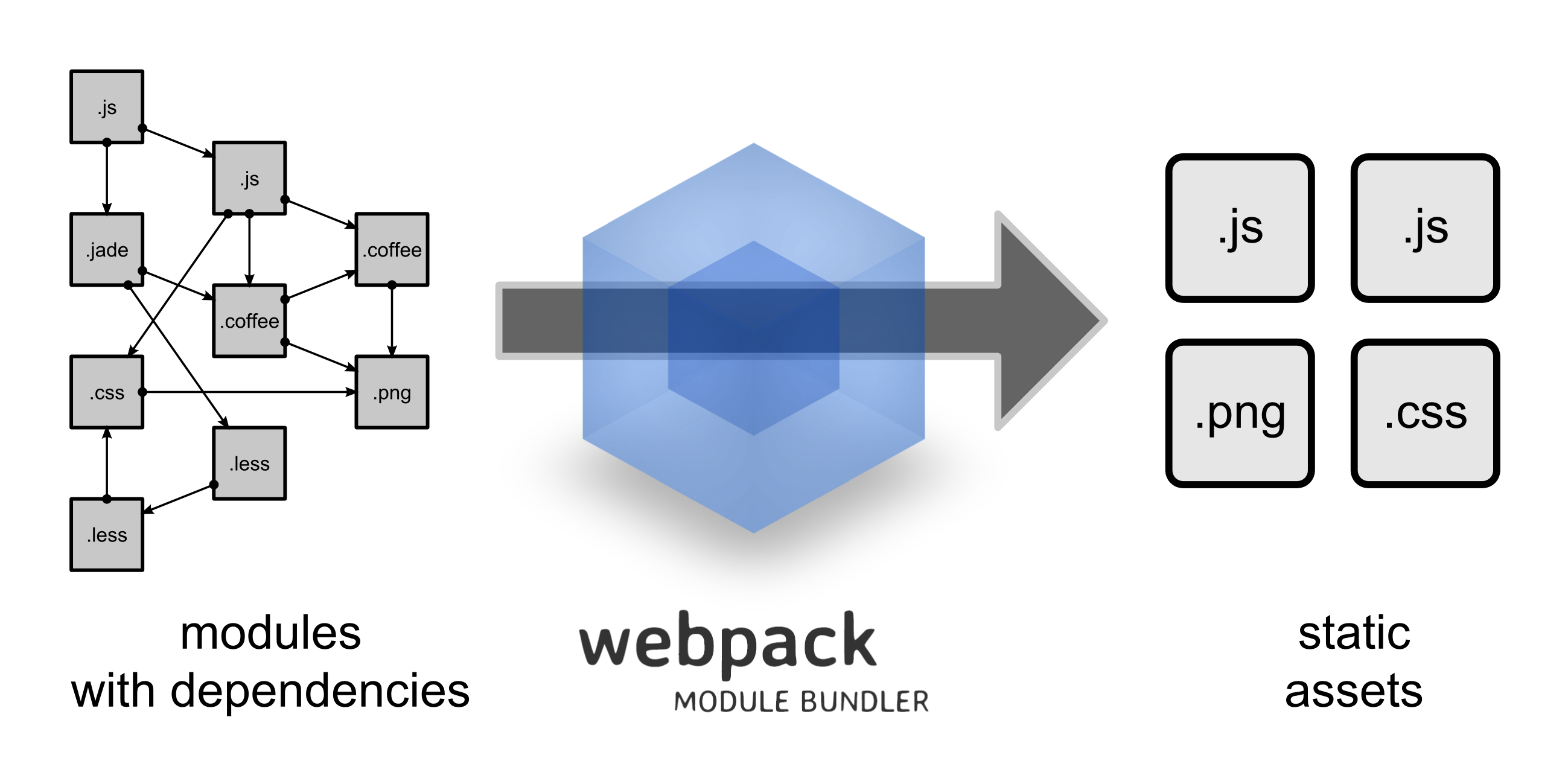
}Girdi: kaynak kodunuz (modüller ağı) ve konfigürasyonunuz
Çıktı: emit edilen fiziksel dosyalar
Neler modüldür?
define(["a", "b"], function(){ ... });
require("./index.css");
const svg = require("./static/resim.svg");
const jpeg = require("./static/resim2.jpeg");
const foo = require("./bar.js)";
// ya da ES2015 import
import foo from "./bar.js"
@import url("https://fonts.googleapis.com/css?family=Roboto");
@font-face {
font-family: "Roboto";
src: url("/fonts/Roboto-Regular.ttf") format("truetype");
}
Minimum Viable Product
Mutabık mıyız?
> node -v # 4 ve üzeri
> npm -v # 3 ve üzeri
> git --version # varlığı yeterKaç saniye sürecek?
> mkdir webpack-test && cd webpack-test
> npm init -y
> npm i -D webpack # ~30sn
./package.json
"scripts": {
  "start": "webpack",
  "watch": "webpack -w",
}
./webpack.config.js (ya da webpackfile.js)
const path = require("path");

module.exports = function(env) {
  return {
    context: path.resolve(__dirname, "src"),
    entry: ["./index.js"],
    output: {
      filename: "bundle.js",
      path: path.resolve(__dirname, "build"),
    }
  }
}> mkdir src && cd src./src/index.js
console.dir(navigator)> npm start./build/index.html
<body><script src="bundle.js"></script></body>CSS
> npm i -D css-loader style-loaderwebpack.config.js
{
  entry: /**************/,
  output: /**************/,
  module: {
    rules: [
      {
        test: /\.css$/,
        include: path.resolve(__dirname, "src"),
        loaders: ["style-loader", "css-loader"]
      }
    ]
  },
}
./src/index.css
body {
  background: blue;
}
./src/index.js
require("./index.css");
console.dir(navigator);
> npm start> rm build/index.html> npm i -D html-webpack-pluginwebpack.config.js
const HtmlWebpackPlugin = require("html-webpack-plugin");
module.exports = function(env) {
  return {
    entry: /*****************/,
    output: /*****************/,
    module: /*****************/,
    plugins: [new HtmlWebpackPlugin()],
  }
}
> npm run watch> npm i <herhangi bir şey>index.js
const lib = require("herhangi")Du bi dinle
> git clone https://github.com/d0ruk/webpack-sunum
> cd webpack-sunum
> git checkout mvp
> npm i- config'de değişiklik yaparsanız, compilation'ı yeniden başlatmalısınız
- loader sırası önemli
- her eklenen loader'da, bundle'ınıza eklenen runtime boyutu artar
- kullanımı legal birden çok sentaks var
{
  entry: {
    "chunkName1": "./src/index.js",  // string | [string]
    "chunkName2": "./src/index.amd.js"
  },
}
module: {
rules: [
{
test: /\.css$/,
include: path.resolve(__dirname, "src"),
use: [
{ loader: "style-loader" },
{ loader: "css-loader" },
]
}
]
}- emit edilen dosyaların isimleri değişken olabiliyor
{
  output: {
    filename: "[name]_[hash].js", // [hash] [chunkhash]
    path: path.resolve(__dirname, "build"),
    publicPath: "//cdn.example.com/[hash]",
  }
}
hesaplanan hash default 20 karakter
[hash:5] gibi limitlenebiliyor
- loader'lar zincirlenebilir
- use kuralında options olabilir
module: {
  rules: [{
    test: /\.css$/,
    use: [
      { loader: "style-loader" },
      {
        loader: "css-loader",
        options: { importLoaders: 1 }
      },
      {
        loader: "less-loader",
        options: { noIeCompat: true }
      }
    ]
  }]
}
Config objesinin çoğu bu 4 key altında tanımlanıyor
return {
  entry: { "chunkName": [String] },
  output: {
    filename: String,
    path: String
  },
  module: {
    rules: [{
      test: RegExp,
      use: [{ loader: String, options: {} }, {}, {}],
    }, {}, {}]
  },
  plugins: []
}
Yazmaya devam
npm i -D extract-text-webpack-plugin@2.1.2
const ExtractTextPlugin = require("extract-text-webpack-plugin");{
test: /\.css$/,
include: path.resolve(__dirname, "src"),
use: ExtractTextPlugin.extract({
fallback: "style-loader",
use: [
{ loader: "css-loader" },
]
})
}plugins: [
new HtmlWebpackPlugin(),
new ExtractTextPlugin({ filename: "styles.css" }),
]{ filename: "[name]_[hash:5].css" } // [id] [contenthash]her compilation'da farklı isimde bir dosya emit ediyor
npm i -D clean-webpack-plugin
const CleanWebpackPlugin = require("clean-webpack-plugin");

return {
  plugins: [
    new CleanWebpackPlugin([path.resolve(__dirname, "build/**.**")]),
  ]
}
npm i -D babel-loader babel-core babel-preset-env babel-preset-react
module: {
  rules: [
    /************************/
    {
      test: /\.js$/,
      include: path.resolve(__dirname, "src"),
      use: [
        {
          loader: "babel-loader",
          options: { presets: ["react", "env"] }
        }
      ]
    }
  ]
}
npm i react react-dom
./src/index.js
import "./index.css"
import React from "react"
import ReactDOM from "react-dom"
const Component = () => Merhaba Dünya
;
ReactDOM.render(<Component />, document.body);ReactDOM.render(<Component />, document.getElementById("app"));new HtmlWebpackPlugin({
title: "Taytıl",
template: "template.html" // relative to global context
})./src/template.html
<head>
  <title><%= htmlWebpackPlugin.options.title %></title>
</head>
<body>
  <div id="app"></div>
</body>
npm i -D postcss-loader autoprefixer
const autoprefixer = require("autoprefixer");
return {
  // ......
  {
    test: /\.css$/,
    use : ExtractTextPlugin.extract({
      // ......
      use: [
        // ......
        {
          loader: "postcss-loader",
          options: { plugins: [autoprefixer] }
        }
      ]
    })
  },
}
./src/index.css
#app { box-shadow: 10px 5px 5px green; }pop quiz
const Component = () => <h1><b>Merhaba Dünya</b></h1>;h1 b { color: red; }h1 {
& b {
color: red;
}
}> npm repo postcss-nestingnpm i -D file-loader url-loader
module: {
  rules: [
    {
      test: /.svg$/,
      include: path.resolve(__dirname, "src"),
      use : [
        { loader: "url-loader" }
      ]
    }
  ]
}
options: {
limit: 10 * 1024,
name: "[name].[hash:5].[ext]",
}index.js
import logo from "./webpack-logo.svg"
const Component = () => (
Merhaba Dünya
 );
);
Ayrı çevrelerin config'leri
> ./node_modules/.bin/webpack --env merhabawebpack.config.js
module.exports = env => {
  console.log(env); // merhaba

  return {};
}
yani
module.exports = env => {
  const isDev = env === "development";

  return {};
}const webpack = require("webpack");
> git checkout voltran
> npm i- env değiştiğinde config de değişmeli
- webpack CLI --config alabiliyor
> webpack --config myConfig.jsconst arr = [1, 2, 3];
const arr2 = arr.concat(true ? [4] : [5]); // [1, 2, 3, 4]
const arr3 = arr.concat(false ? [4] : [5]); // [1, 2, 3, 5]module.exports = function(env) {
const isDev = env === "development";
const toAppend = isDev
? []
: [new CleanWebpackPlugin([path.resolve(__dirname, "build/**.**")])];
return {}
}output: {
filename: isDev
? "[name].js"
: "[name]_[hash:5].js",
path: path.resolve(__dirname, "build"),
}plugins: [
/*******************/
new ExtractTextPlugin({
filename: isDev
? "[name].css"
: "[name]_[hash:5].css",
}),
].concat(toAppend)> webpack -p===
> webpack --optimize-minimize --define process.env.NODE_ENV="production"===
{
  module: /*****************/,
  plugins: [
    new webpack.optimize.UglifyJsPlugin(),
    new webpack.DefinePlugin({
      process: {
        env: { NODE_ENV: JSON.stringify("production") }
      }
    }),
  ],
}
return {
plugins: [
/*******************/,
new webpack.DefinePlugin({
process: {
env: {
NODE_ENV: isDev
? JSON.stringify("development")
: JSON.stringify("production")
}
}
}),
]
}index.js
const Component = () => (

    {JSON.stringify(process, null, 2)}

);
[new CleanWebpackPlugin(/**************/),
new webpack.optimize.UglifyJsPlugin({
compress: {
warnings: false,
drop_console: true,
dead_code: true,
unused: true,
},
mangle: false,
comments: false,
}),
]package.json
"scripts": {
  "start": "webpack --progress --hide-modules",
  "watch": "webpack -w --progress --hide-modules --env development"
}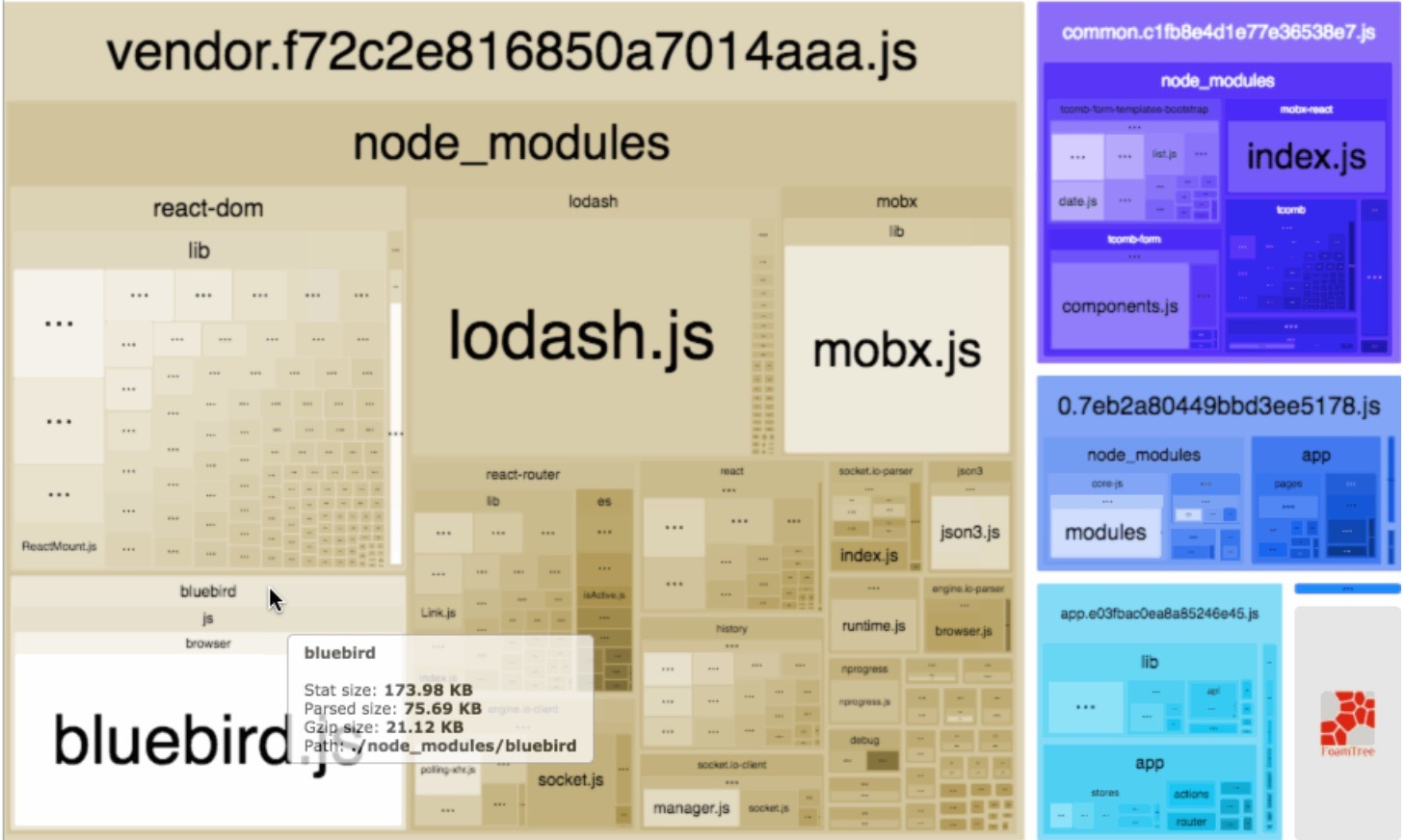
Common Chunk(s)
plugins: [new webpack.optimize.CommonsChunkPlugin(options)]{
name: String, // ya da names: [String]
filename: String, // default'u output.filename
minChunks: Number|Infinity|function(module, count) -> boolean,
}entry: {
"home": "./home.js",
"about": "./about.js",
},plugins: [
new HtmlWebpackPlugin({
title: "Home",
template: "template.html",
filename: "home.html",
}),
new HtmlWebpackPlugin({
title: "About",
template: "template.html",
filename: "about.html",
}),
]plugins : [
new webpack.optimize.CommonsChunkPlugin({ name: "commons" }),
]plugins: [
new webpack.optimize.CommonsChunkPlugin("commons"),
]tomato tomato
new webpack.optimize.CommonsChunkPlugin({
  name: "commons",
  minChunks: 2
})
new webpack.optimize.CommonsChunkPlugin({
name: "commons",
minChunks: function(m, cnt) {
return cnt === 2;
}
})tomato tomato
minChunks: function(m, cnt) {
  return m.context && m.context.includes("node_modules");
}
bak çok ilginç
{ name: ["commons", "asdawd"] }pop quiz
node_modules'da olanları bir chunk'a,
runtime kodunu bir başka chunk'a koy
new webpack.optimize.CommonsChunkPlugin({
  name: "bootstrap",
  minChunks: (m, cnt) => !m.context
})developers developers developers
npm i -D webpack-dev-server
middleware'la webpack compilation yapan
node.js http(s) server
"scripts": {
  "start": "webpack -w --progress --hide-modules",
  "dev": "webpack-dev-server",
  "build": "webpack --progress --hide-modules --env production"
},- frontend asset'lerinizi serve etmeye yarar - backend development yapmaya uygun değil
- emit edilenleri bellekte saklar (in-memory) - fiziksel dosya yaratmaz
return {
  entry: /*************/,
  output: /*************/,
  devtool: "source-map"
}
class Component extends React.Component {
constructor() {
super();
setTimeout(() => { throw new Error("boom"); }, 2000);
}
render() {}
}"dev": "webpack-dev-server --env development",devtool: isDev ? "eval-source-map" : "source-map",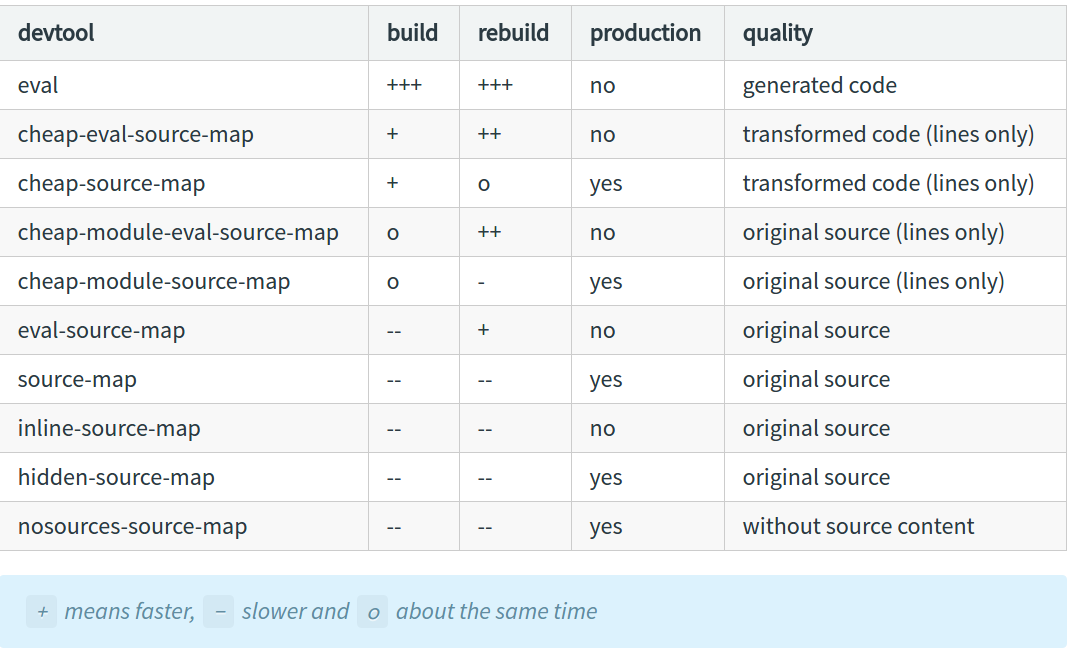
Hot Module Replacement
- modüllerdeki değişiklikleri .hot-update dosyalarıyla canlı uygulamaya patch eder
- sayfa refresh etmeden geliştirme yapmayı sağlar
- böylece uygulamadaki etkilenmeyen modüller state'lerini kaybetmezler
aktif etmek için 3 şey gerekir
- client tarafındaki modülün HMR'ı accept() etmesi
- devServer: { hot: true }
- webpack.HotModuleReplacementPlugin
modülün HMR kabul etmesi
if(module.hot) {
  module.hot.accept();
}- modüllerin accept() etmesi bubble-up şeklinde propagate eder
- modül ağacındaki tek bir modülün HMR'ı accept() etmesi bütün modül ağacını yeniden compile eder
config'de devServer
return {
  entry: /*************/,
  output: /*************/,
  devServer: {
    port: 9000,
    open: true,
    hot: true,
    overlay: true,
    stats: "normal",
  }
}
stats: {
assets: true,
chunks: false,
colors: true,
entrypoints: true,
modules: false,
timings: true,
}.hot-update chunk'larını oluşturan plugin
const toAppend = isDev
  ? [new webpack.HotModuleReplacementPlugin(),
    new webpack.NamedModulesPlugin()]
  : [new CleanWebpackPlugin(/*************/),]
> npm run devCSS hot update ediyor mu?
new ExtractTextPlugin({
  filename: isDev
    ? "[name].css"
    : "[name]_[hash:5].css",
  disable: isDev,
})npm i -D babel-plugin-syntax-dynamic-import
{
  loader: "babel-loader",
  options: {
    presets: ["react", "env"],
    plugins: [require("babel-plugin-syntax-dynamic-import")],
  } // v7.x syntax
}
webpack.config.js
entry: {
  "main": "./index.js",
  // "ticker": "./Ticker.js"
},
index.js
import("./Ticker.js")
.then(m => {
  ReactDOM.render(<Component />, document.getElementById("app"));
  ReactDOM.render(<m.default />, document.getElementById("app2"));
})
.catch(console.error)
import(/* webpackChunkName: "sayac" */ "./Ticker.js")output: {
filename: isDev
? "[name].js"
: "[name]_[hash:5].js",
path: path.resolve(__dirname, "build"),
chunkFilename: "[name].chunk.js",
},Du bi dinle
target: "web" | "webworker" | "node" | "async-node" | "node-webkit" | "electron-main" | "electron-renderer"bail: true | falsemodule: {
rules: [
{
test: /\.js?$/,
enforce: "pre",
loader: "eslint-loader"
}
]
}return {
entry: /*************/,
output: /*************/,
resolve: {
extensions: [".js", "json", ".styl"],
alias: {
Utilities: path.resolve(__dirname, "src/utilities/"),
Templates: path.resolve(__dirname, "src/templates/")
}
},
}import Utility from "../../utilities/utility"yerine
import Utility from "Utilities/utility"output: {
filename: "[name]_[hash:5].js",
path: path.resolve(__dirname, "build"),
libraryTarget: "amd",
library: "myLib"
}libraryTarget: "var" | "amd" | "umd" | "this" | "window" | "global" | "commonjs" | "commonjs2"webpack.LoaderOptionsPlugin
new webpack.LoaderOptionsPlugin({
  minimize: true,
  debug: false,
  options: {
    context: __dirname
  }
})- eski versiyon config'lere uyumluluk için var
- CLI'ın eski versiyonları, bazı ayarları global olarak loader'lara veriyor
- webpack@3'ten itibaren, loader'a options vermek config'i yazanın sorumluluğu
- gelecekteki bir sürümde kaldırılacak
tree shaking
- dead code elimination, ulaşılamayan blokları temizler
if (false) console.log("dead code")- tree shaking, ulaşılabilen ama kullanmadığınız kod öbeklerini temizler
import { aSingleFunction } from "huge-lib"- ES2015 modüllerini transpile etmemelisiniz
use: [
  {
    loader: "babel-loader",
    options: {
      presets: ["react", ["env", { modules: false }]],
    }
  }
]