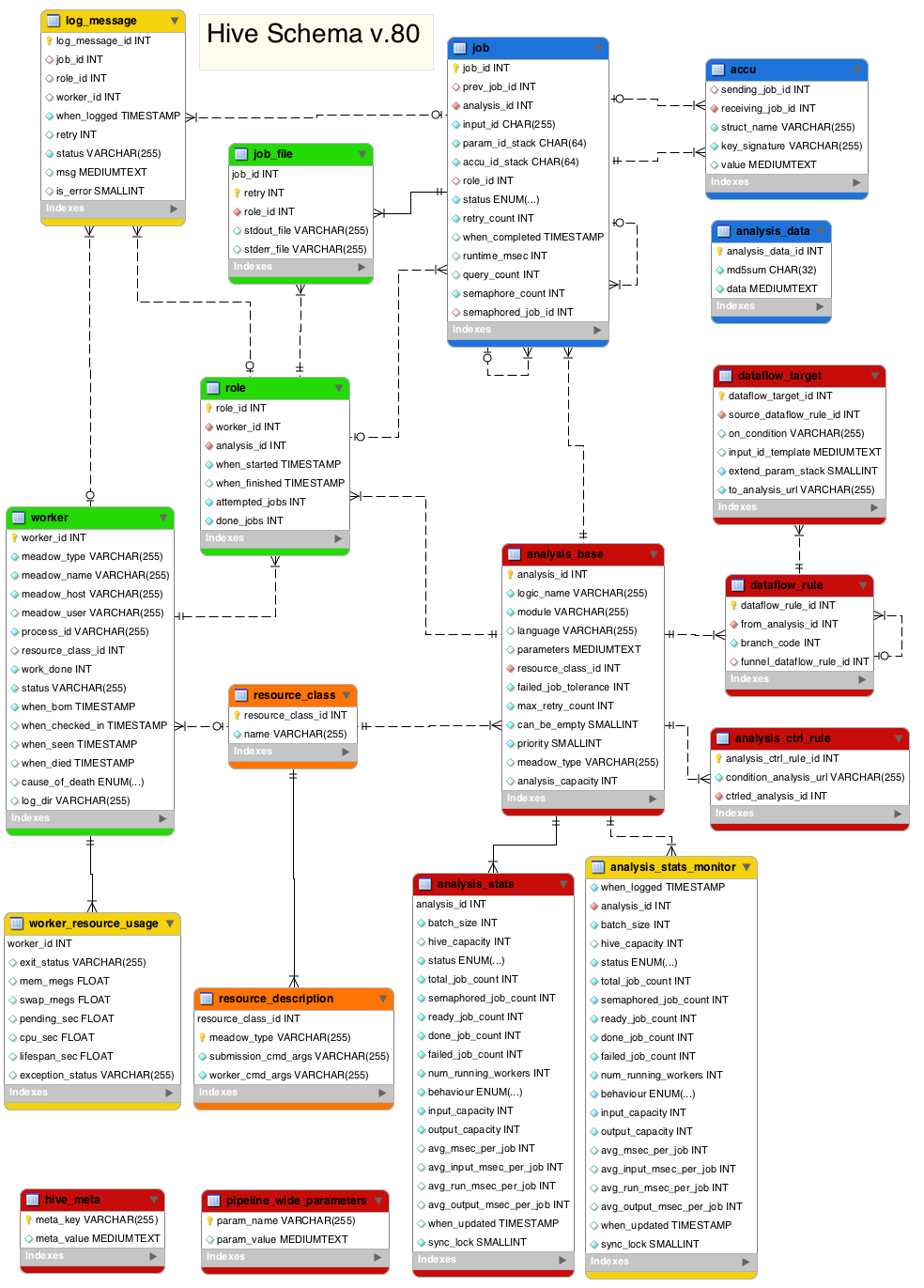
This document describes the tables that make up the Hive schema. Tables are grouped into categories, and the purpose of each table is explained.
You can toggle the display of individual columns using [Show/Hide columns] buttons.
This table keeps several important hive-specific pipeline-wide key-value pairs such as hive_sql_schema_version, hive_use_triggers and hive_pipeline_name.
This table contains a simple hash between pipeline_wide_parameter names and their values. The same data used to live in 'meta' table until both the schema and the API were finally separated from Ensembl Core.
Each Analysis is a node of the pipeline diagram. It acts both as a "class" to which Jobs belong (and inherit from it certain properties) and as a "container" for them (Jobs of an Analysis can be blocking all Jobs of another Analysis).
Column
Type
Default value
Description
Index
analysis_id
INTEGER
-
a unique ID that is also a foreign key to most of the other tables
logic_name
VARCHAR(255)
-
the name of the Analysis object
unique key: logic_name_idx
module
VARCHAR(255)
-
the name of the module / package that runs this Analysis
language
VARCHAR(255)
NULL
the language of the module, if not Perl
parameters
MEDIUMTEXT
NULL
a stingified hash of parameters common to all jobs of the Analysis
resource_class_id
INTEGER
-
link to the resource_class table
failed_job_tolerance
INTEGER
0
% of tolerated failed Jobs
max_retry_count
INTEGER
3
how many times a job of this Analysis will be retried (unless there is no point)
can_be_empty
SMALLINT
0
if TRUE, this Analysis will not be blocking if/while it doesn't have any jobs
priority
SMALLINT
0
an Analysis with higher priority will be more likely chosen on Worker's specialization
meadow_type
VARCHAR(255)
NULL
if defined, forces this Analysis to be run only on the given Meadow
analysis_capacity
INTEGER
NULL
if defined, limits the number of Workers of this particular Analysis that are allowed to run in parallel
Parallel table to analysis_base which provides high level statistics on the state of an analysis and it's jobs. Used to provide a fast overview, and to provide final approval of 'DONE' which is used by the blocking rules to determine when to unblock other analyses. Also provides
Column
Type
Default value
Description
Index
analysis_id
INTEGER
-
foreign-keyed to the corresponding analysis_base entry
primary key
batch_size
INTEGER
1
how many jobs are claimed in one claiming operation before Worker starts executing them
hive_capacity
INTEGER
NULL
a reciprocal limiter on the number of Workers running at the same time (dependent on Workers of other Analyses)
Each entry of this table defines a starting point for dataflow (via from_analysis_id and branch_code) to which point a group of dataflow_target entries can be linked. This grouping is used in two ways: (1) dataflow_target entries that link into the same dataflow_rule share the same from_analysis, branch_code and funnel_dataflow_rule (2) to define the conditions for DEFAULT or ELSE case (via excluding all conditions explicitly listed in the group)
Column
Type
Default value
Description
Index
dataflow_rule_id
INTEGER
-
internal ID
from_analysis_id
INTEGER
-
foreign key to analysis table analysis_id
branch_code
INTEGER
1
branch_code of the fan
funnel_dataflow_rule_id
INTEGER
NULL
dataflow_rule_id of the semaphored funnel (is NULL by default, which means dataflow is not semaphored)
This table links specific conditions with the target object (Analysis/Table/Accu) and optional input_id_template.
Column
Type
Default value
Description
Index
dataflow_target_id
INTEGER
-
internal ID
source_dataflow_rule_id
INTEGER
-
foreign key to the dataflow_rule object that defines grouping (see description of dataflow_rule table)
unique: key
on_condition
VARCHAR(255)
NULL
param-substitutable string evaluated at the moment of dataflow event that defines whether or not this case produces any dataflow; NULL means DEFAULT or ELSE
unique: key
input_id_template
MEDIUMTEXT
NULL
a template for generating a new input_id (not necessarily a hashref) in this dataflow; if undefined is kept original
unique: key
extend_param_stack
SMALLINT
0
the boolean value defines whether the newly created jobs will inherit both the parameters and the accu of the prev_job
to_analysis_url
VARCHAR(255)
''
the URL of the dataflow target object (Analysis/Table/Accu)
These rules define a higher level of control. These rules are used to turn whole anlysis nodes on/off (READY/BLOCKED). If any of the condition_analyses are not 'DONE' the ctrled_analysis is set to BLOCKED. When all conditions become 'DONE' then ctrled_analysis is set to READY The workers switch the analysis.status to 'WORKING' and 'DONE'. But any moment if a condition goes false, the analysis is reset to BLOCKED.
The job is the heart of this system. It is the kiosk or blackboard where workers find things to do and then post work for other works to do. These jobs are created prior to work being done, are claimed by workers, are updated as the work is done, with a final update on completion.
For testing/debugging purposes both STDOUT and STDERR streams of each Job can be redirected into a separate log file. This table holds filesystem paths to one or both of those files. There is max one entry per job_id and retry.
A generic blob-storage hash. Currently the only legitimate use of this table is "overflow" of job.input_ids: when they grow longer than 254 characters the real data is stored in analysis_data instead, and the input_id contains the corresponding analysis_data_id.
Column
Type
Default value
Description
Index
analysis_data_id
INTEGER
-
primary id
md5sum
CHAR(32)
-
checksum over the data to quickly detect (potential) collisions
Entries of this table correspond to Worker objects of the API. Workers are created by inserting into this table so that there is only one instance of a Worker object in the database. As Workers live and do work, they update this table, and when they die they update again.
Column
Type
Default value
Description
Index
worker_id
INTEGER
-
unique ID of the Worker
meadow_type
VARCHAR(255)
-
type of the Meadow it is running on
key: meadow_process
meadow_name
VARCHAR(255)
-
name of the Meadow it is running on (for meadow_type=='LOCAL' it is the same as meadow_host)
key: meadow_process
meadow_host
VARCHAR(255)
-
execution host name
meadow_user
VARCHAR(255)
NULL
scheduling/execution user name (within the Meadow)
process_id
VARCHAR(255)
-
identifies the Worker process on the Meadow (for 'LOCAL' is the OS PID)
key: meadow_process
resource_class_id
INTEGER
NULL
links to Worker's resource class
work_done
INTEGER
0
how many jobs the Worker has completed successfully
status
VARCHAR(255)
'READY'
current status of the Worker
when_born
TIMESTAMP
CURRENT_TIMESTAMP
when the Worker process was started
when_checked_in
TIMESTAMP
NULL
when the Worker last checked into the database
when_seen
TIMESTAMP
NULL
when the Worker was last seen by the Meadow
when_died
TIMESTAMP
NULL
if defined, when the Worker died (or its premature death was first detected by GC)
Entries of this table correspond to Role objects of the API. When a Worker specializes, it acquires a Role, which is a temporary link between the Worker and a resource-compatible Analysis.
Column
Type
Default value
Description
Index
role_id
INTEGER
-
unique ID of the Role
worker_id
INTEGER
-
the specialized Worker
key: worker
analysis_id
INTEGER
-
the Analysis into which the Worker specialized
key: analysis
when_started
TIMESTAMP
CURRENT_TIMESTAMP
when this Role started
when_finished
TIMESTAMP
NULL
when this Role finished. NULL may either indicate it is still running or was killed by an external force.
A table with post-mortem resource usage statistics of a Worker. This table is not automatically populated: you first need to run load_resource_usage.pl. Note that some meadows (like LOCAL) do not support post-mortem inspection of resource usage
Column
Type
Default value
Description
Index
worker_id
INTEGER
-
links to the worker table
primary key
exit_status
VARCHAR(255)
NULL
meadow-dependent, in case of LSF it's usually 'done' (normal) or 'exit' (abnormal)
mem_megs
FLOAT
NULL
how much memory the Worker process used
swap_megs
FLOAT
NULL
how much swap the Worker process used
pending_sec
FLOAT
NULL
time spent by the process in the queue before it became a Worker
cpu_sec
FLOAT
NULL
cpu time (in seconds) used by the Worker process. It is often lower than the walltime because of time spent in I/O waits, but it can also be higher if the process is multi-threaded
lifespan_sec
FLOAT
NULL
walltime (in seconds) used by the Worker process. It is often higher than the sum of its jobs' "runtime_msec" because of the overhead from the Worker itself
exception_status
VARCHAR(255)
NULL
meadow-specific flags, in case of LSF it can be 'underrun', 'overrun' or 'idle'
When a Job or a job-less Worker (job_id=NULL) throws a "die" message for any reason, the message is recorded in this table. It may or may not indicate that the job was unsuccessful via is_error flag. Also $self->warning("...") messages are recorded with is_error=0.
Column
Type
Default value
Description
Index
log_message_id
INTEGER
-
an autoincremented primary id of the message
job_id
INTEGER
NULL
the id of the job that threw the message (or NULL if it was outside of a message)
key: job_id
role_id
INTEGER
NULL
the 'current' role
worker_id
INTEGER
NULL
the 'current' worker
key: worker_id
when_logged
TIMESTAMP
CURRENT_TIMESTAMP
when the message was thrown
retry
INTEGER
NULL
retry_count of the job when the message was thrown (or NULL if no job)
 Show columns